


3-Day
Online Bootcamp


Taught in Xcode
Learn Swift in 3 days.
Taught by iOS Developers.
Taught only with practical pair programming exercises. Each lesson uses Xcode playgrounds. Developed for fast learning. Our students build a SOLID foundation fully understanding each topic.
Each lesson is taught in Xcode and is taught in a pair programming style following guidance from an instructor - a highly trained iOS Developer and consultant in the tech industry.
Our online course was written and created by developers with many years of commercial experience as a gift to the tech industry to solve this problem. Our goal is to provide a calm and easy-to-understand explanation of complicated topics, combined with repetition and sufficient typing-practice in order to train the mind to retain a simpler understanding of the Swift language at a basic level, resulting in a stronger foundation of knowledge that'll serve to grow and support a successful career as a Swift Engineer / iOS Developer.


⚡️


3 Days Of Swift
Bootcamp
An introduction to Swift - Taught exclusively in Xcode
Our first camp; A 3-Day Bootcamp introducing the Swift language and its foundational language features.
Taught by iOS Developers.
Taught exclusively in Xcode.
Taught with practical pair programming exercises.
Each lesson uses Xcode playgrounds. Developed for fast learning. Through the repetition of writing code our students build a solid foundation that will allow further self-study to gain skills in even more language features unaided using only written instructions.
Each lesson is taught in Xcode and is taught in a pair programming style following guidance from an instructor - a highly trained iOS Developer and consultant in the tech industry.
Our online course was written and created by developers with many years of commercial experience as a gift to the tech industry to solve this problem. Our goal is to provide a calm and easy-to-understand explanation of complicated topics, combined with repetition and sufficient typing-practice in order to train the mind to retain a simpler understanding of the Swift language at a basic level, resulting in a stronger foundation of knowledge that'll serve to grow and support a successful career as a Swift Engineer / iOS Developer.
Hover over the image below and click Enter.
👆 Click the image above
Members access only - FREE signup

We Teach in Xcode
Learn Swift inside Xcode - the software used to build apps
Xcode is the software used in industry to write software for Apple products. It's your gateway to creating projects, playgrounds, submitting apps to the AppStore and editing code for existing apps.
All our lessons take place in Xcode.

Xcode is the software you'll use in the tech industry..
Use it, and gain experience with it immediately.
Follow
Instructions
Pair programming with an instructor

We teach using pair programming.
Pair programming when done remotely (like ours) is usually structured where two developers work together over a video call to write code and solve a problem. One person will "drive" and be sharing their screen while in Xcode (this is you). The other team mate will guide you and provide direction (this is your instructor).
Your instructor talks (via screen sharing video)
providing instructions..
..you listen
whilst writing code
How to
Get Started
Just sign up!.. or watch lessons 1 - 3 now

You have two choices:
Option 1: You can sign up to the full course and become a member of our website. If you are keen to take the course and learn Swift, then this is your best choice with little fuss.
🥾 Bootcamp
3DaysOfSwift Bootcamp - An introduction to Swift
A bootcamp fully taught in Xcode, pair-programming with an iOS app developer. 3 days learning Swift. 1 day of coursework. Free Xcode project - 123Calc iOS app.

or
Option 2: Start watching lesson 1 right now using the button below without signup. You are required to become a member before watching lesson 4. Remember, it's all free! 😉
🥾 Lesson 1
3DaysOfSwift Bootcamp - An introduction to Swift
Take the first lesson in the 3 Days Of Swift Bootcamp to teach Swift without signup. The online video will appear in the next page and then press play.

Lesson Schedule
The full index of contents is below - 3 days and coursework
Our first lesson starts with a traditional Hello World program. This is traditional when learning a new programming language.
We'll follow on to learn basic programming techniques including how to use variables. You'll learn all the technical terminology such as Type Annotation & Type Inference. You will also learn keyboard shortcuts and some other tips about working in the tech industry too.
1. Hello World
2. Variables
3. Types
4. Type Inference & Type Annotation
5. Functions
6. Tuples
7. Creating a System
8. Variable Names
8. Creating a Class
9. Instances
10. Creating a Struct
11. Creating an Enum
12. Classes, Structs & Enums
13. If Statements
14. Xcode Playground Pages
15. FizzBuzz - An Interview Question
16. FizzBuzz - Your Turn
17. Literal Values
18. Optionals
19. Task - FizzBuzz a List of Numbers
20. Runtime Errors (System Crashes)
21. Strings
22. Collection Types
23. Task - Create Palindrome Checker
24. Arrays
Software Task 1: Build a Calculator
Software Task 2: Add a Feature
Software Task 3: Append Numeric Input
Software Task 4: Append Fraction Input
Software Task 5: Responsibilities
Software Task 6: Add a UI Class
Software Task 7: Code Review & Tidy Up
Download Xcode App Project - UIKit & SwiftUI - iOS Calculator based on the coursework code. Intended as an example of what an Xcode project might look like for an app on the AppStore.
Why
is it Free?
We are seniors trying to share resources & tips
We dedicated 3 years to teaching young graduates how to code in Swift and how to build software.
We noticed that the worst engineers were those who "learnt Swift" with online courses that in fact did not teach Swift but focussed on frameworks, UI and building apps.
They didn't spend enough time learning the Swift language and wasted time on UI.
We built some material to help.
It's fast and doesn't try to focus on everything all at once!
Good luck.

Click here to find out more
Coding Basics
-
Variables
-
Type annotation
-
Type inference
-
Data types
-
Literal Values
-
Functions
-
Tuples
-
Creating a system
-
Xcode playgrounds
-
Structs
-
Classes
-
Enums
-
If statements
Control Flow
-
If statements
-
If then else statements
-
Multiple if statements
-
Switch statements
-
Switch statements for enums with associated values
-
Control transfer statements
-
For - in loop
-
While loop
-
Repeat-while loop
-
Intervals
-
Comparison operators
Code Encapsulation
-
Functions
-
Closures
-
Structs
-
Classes
-
Enums
-
When to use an enum, struct or class
-
Building a basic system using custom types (enums, structs and classes).
Memory Management
-
Reference Counting
-
ARC Automatic Reference Counting
-
Value types
-
References types
Types
-
Variables
-
Type annotation
-
Type inference
-
Data types
-
Literal Values
-
Functions
-
Tuples
-
Creating a system
-
Xcode playgrounds
-
Structs
-
Classes
-
Enums
-
If statements
Topics Not Included
-
Swift concurrency
-
Throwing errors
-
Generics
-
Networking
-
Completion handlers
-
Result enum
-
Protocols
The
Topics Taught
Just sign up!.. or watch lessons 1-3 now
Our 3 day course covers all commonly used language features required to start a job as a junior developer in the tech industry.
The
3 Days
The 3 Days Of Swift
Day 1
Variables
-
Hello World
-
Variables
-
Types
-
Type Inference & Type Annotation
-
Functions
-
Tuples
-
Creating a system
-
Variable Names
Day 2
Code Encapsulation
-
Using Xcode Playground Pages
-
Creating a Struct
-
Instances
-
Creating a Class
-
Creating an Enum
-
Classes, Structs & Enums
-
If Statements
-
FizzBuzz
-
FizzBuzz Task Unaided
Day 3
More Language Features
-
Create a system
-
Optionals
-
Literal Values
-
Strings
-
Create a Palindrome Checker
-
FizzBuzz a List of Numbers
-
Collection Types
-
Runtime Errors & Systems Crashes
-
Arrays
Secret
Day 4
Shhh... 🤫
Day 4
Guided Coursework
-
Build a Calculator
-
Add a Feature
-
Append Numeric Input
-
Append Fraction Input
-
Responsibilities
-
Add a UI Class
-
Code Review & Tidy Guide
Gain an opportunity to write an entire system by yourself.
The first lesson asks you to write a calculator in a playground. Can you?
If not, continue pair programming with your instructor and figure it out together.
Your Teacher
Your teacher is a very Senior iOS Developer


Follow instructions from a seasoned iOS Developer with over 15 years of commercial experience writing whole apps, many mobile games, maintaining corporate apps and publishing over 50 iOS apps to the AppStore.
His experience began in Objective-C in an era when our most favourite Frameworks were still being developed constructing UI in Interface Builder, Xib files and storyboards.
In 2014 it was announced that a new language would replace Objective-C. It was called Swift. Matthew had to re-learn the fundamentals of how to write code, communicate with iOS frameworks and also help others to learn too.
Matthew now dedicates his time to teaching and helping Junior iOS Developers learn Swift and grow in their careers.
View full profile here
You're an amazing teacher Matt! You've always explained things in a way that I can understand.
Senior iOS Developer
London UK
You should be working for Sky News/Sports, best voice commentary l've ever heard in a tech showcase!

Head of Technology
London UK
It was crystal clear and you have a great voice and energy. Can you please narrate my life!
Graduate iOS Developer
London UK
It was an exceptional delivery, especially to somebody who's had no exposure to the area!
Junior iOS Developer
London UK
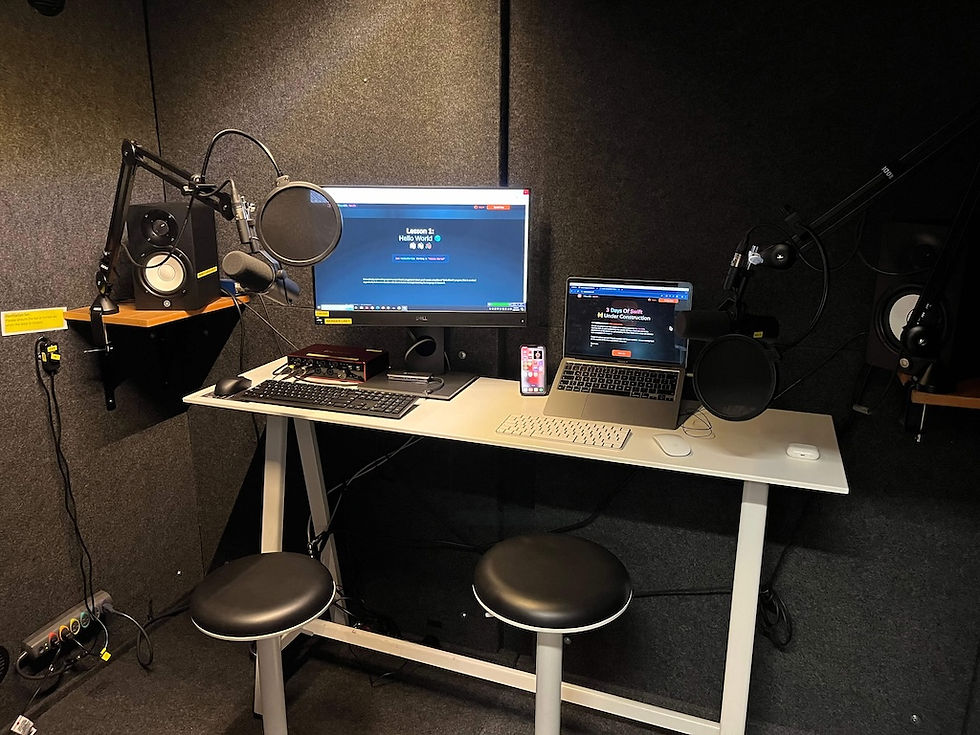
Recording Studio
We tried a professional studio - to see if it helped audio quality
All recorded content for 3 Days Of Swift is recorded in a professional sound proof booth with state of the art Rode microphones. Each lesson is recorded by our most experienced iOS Developer who has spent his career constructing whole software systems while also leading teams and training juniors.
Each lesson has superb audio quality and have been designed for students wearing AirPods with noise cancelling enabled. We hope you enjoy our 1-on-1 pair programming experience with our leading iOS Engineer and consultant, Matthew Thomas.

3 Days
6 hours per day
32
Lessons
24 hours of total video
Common topics covered
Good Luck
We hope you enjoy learning Swift - it's a fun & profitable career
No matter where you learn Swift, make sure you've downloaded our free resources from our site. We're building our service to be completable and therefore it should be a helpful resource to learn some basics, gather some interview prep, download some Xcode playgrounds and then move on to other resources & services elsewhere - we hope you use us & our resources!
Our resources help practice for interviews.
We have a free Swift Cheatsheet of Swift code - great to learn from & super fast to read! ⚡️
We converted Apples official Swift book into an Xcode playground.
We hope you join us & become a member
Good luck from the 3DaysOfSwift community! 👋🏻👋🏽👋🏿
🧑🏽💻🙋🏽♂️🧑🏾💻👨🏿💼🧑🏼💻🧕🏻👩🏼💼👩🏻💻👨🏻💻💁🏼♀️👨🏼💼🙋🏻♂️🧑🏻💻🧑🏿💻🧛🏻♀️🙋🏻♀️👩🏼💻🙋🏿👨🏼💻
Swift
Camps 🏕️🪵🔥
Members access only - FREE signup

.png)


Learn Swift in installments - bit by bit & camp by camp
💡 We're busy building more Camps. ⛺️
💡 Our next Camp - Swift Language Features via Xcode playgrounds with written instructions - no video. Supercharged to learn faster! Videos are time consuming but also add vital information. So, perhaps we can do a little bit of both and supercharge the learning time spent sat by yourself while sat at your desk! ⚡️